 ATOMIC NOTES
Quick answer
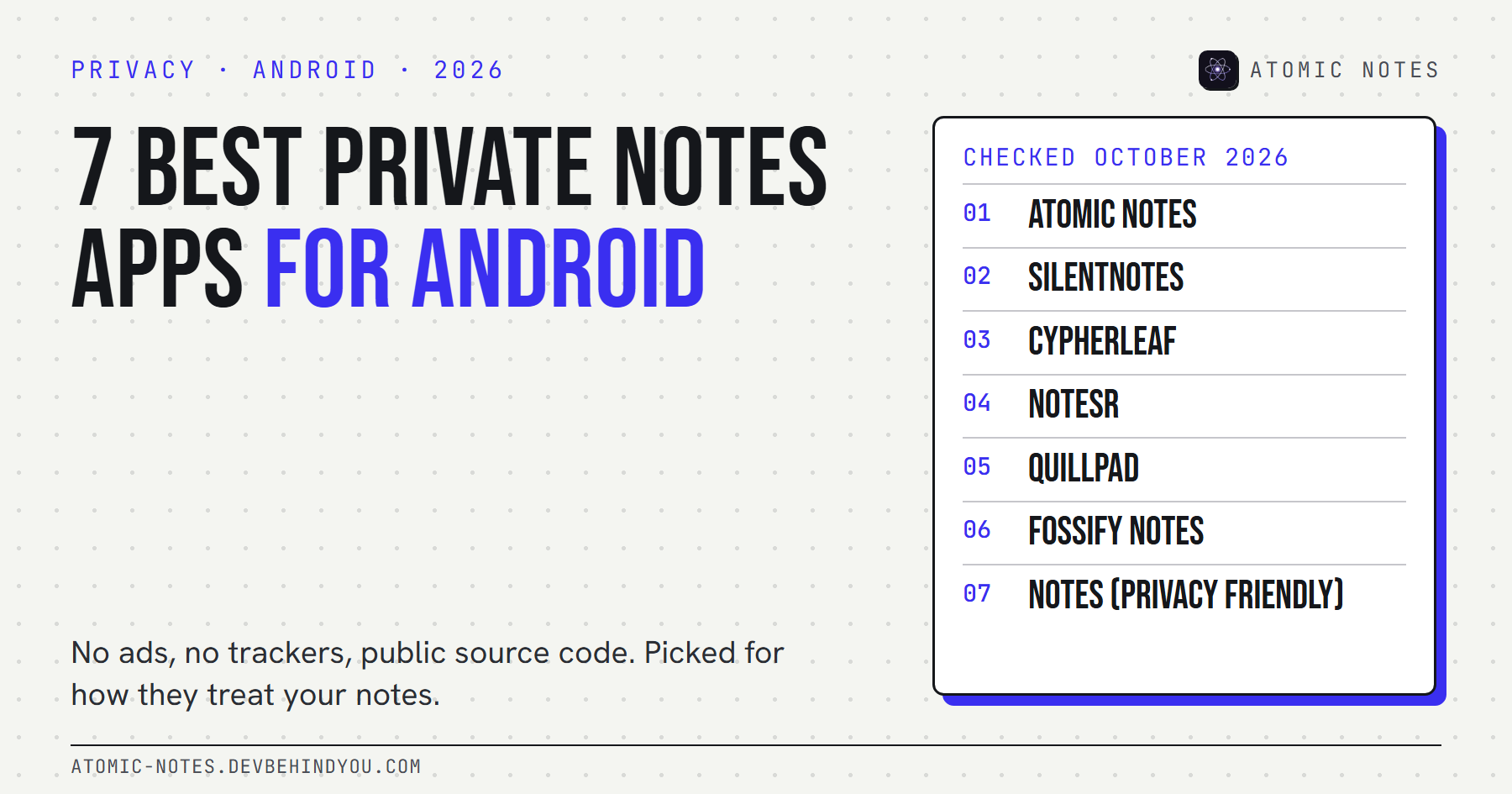
The best private notes app for Android depends on what you need. Atomic Notes syncs to your own Google Drive with an optional end-to-end vault. SilentNotes encrypts everything and syncs to storage you pick. NoteSR, CypherLeaf, Fossify Notes, and Privacy Friendly Notes never touch the internet. Quillpad syncs through your own Nextcloud.
Search the Play Store for a private notes app and you'll find hundreds of them. Many show ads. Some ship analytics SDKs. A few ask for your contacts. "Private" on an app icon is a marketing word, not a promise.
So I set rules first and picked apps second. Every private notes app Android users will find below has no ads, no trackers, public source code, and a release or code update in 2026. I checked each one on October 7, 2026, including its Android permissions.
One disclosure up front: Atomic Notes is my app, so it goes first. Its facts are checkable in its public code, and its weak spots are listed like everyone else's.
What makes a notes app private on Android?
Four things, in this order: where notes are stored, whether the app can reach the internet, who holds the key to any synced copy, and how the app makes money. Everything else is detail.
- Storage. A privacy first notes app keeps notes in local storage on your phone by default. Cloud sync should be a choice, not the starting point.
- Network access. Android only lets an app use the internet if it asks for that permission. No internet permission means your notes can't leave through the app, ever.
- The synced copy. If an app syncs, encrypted sync or storage you own makes the difference between a backup and a copy someone else can read.
- The money. Ads and analytics pay for many free apps. A private notes app Android users can trust is funded by its users or its community instead.
Offline access matters too. Every app on this list opens and saves with no connection, which is the baseline for any notes app worth trusting.
How did these apps make the list?
Six rules, applied to every app, including mine. Popular apps that failed any of them were left out on purpose.
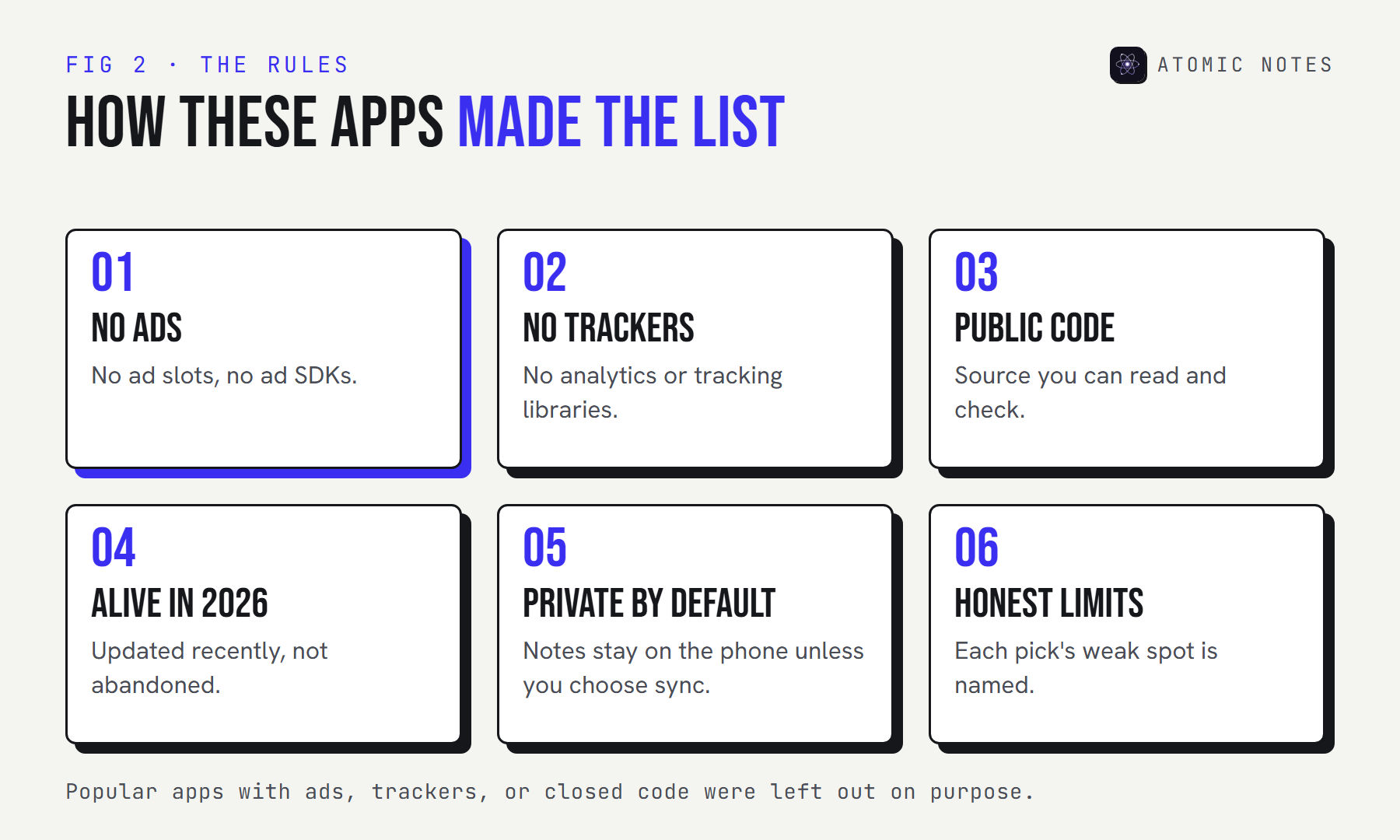
The rules exist because the Play Store's data safety section is self-declared by developers. A label can say "no data collected" and still be wrong. Public code, a permission list, and a recent release are harder to fake.
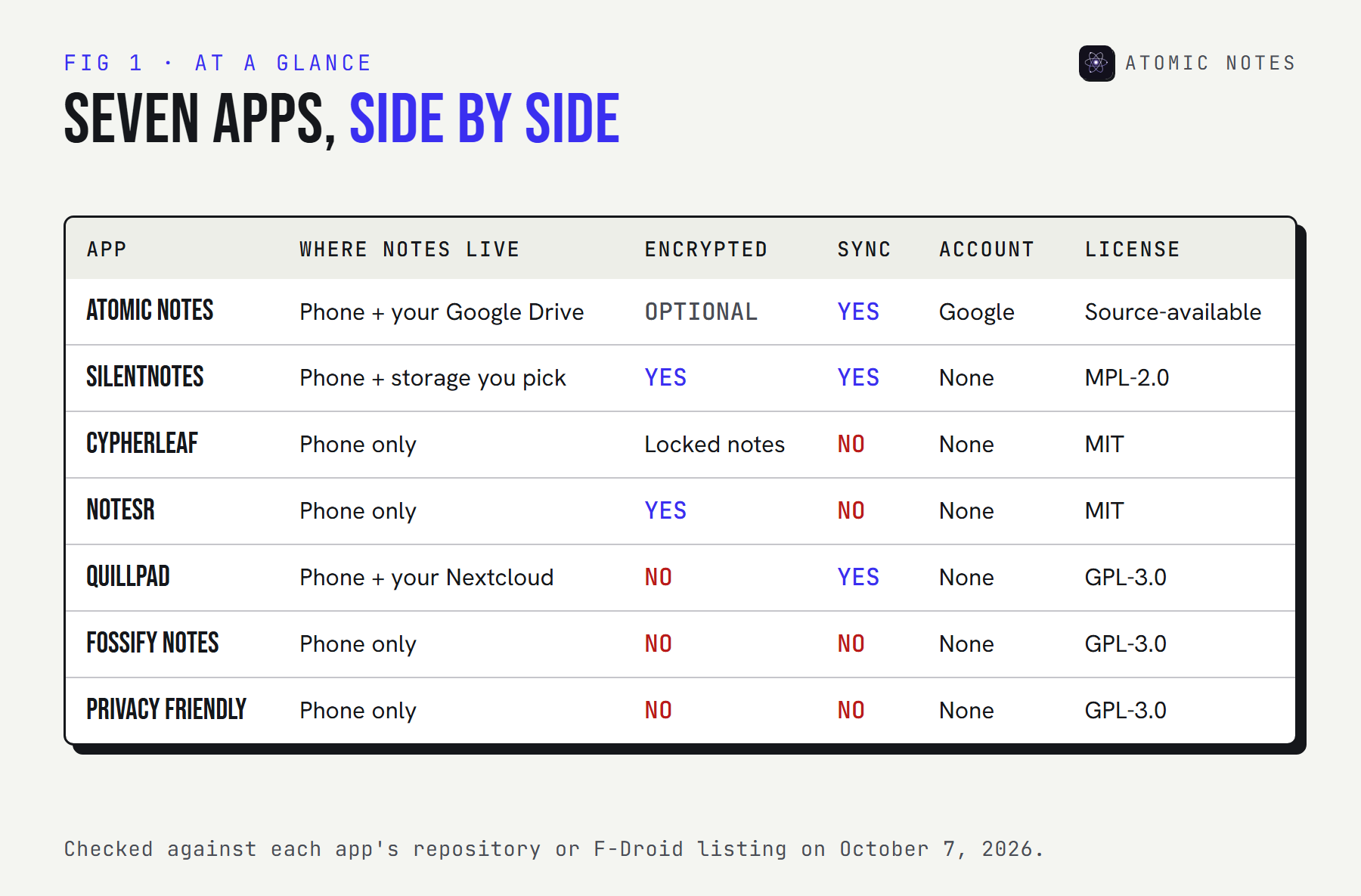
Here's the whole list at a glance:
Not sure where to start? Tell the finder what you need:
FIND YOURS · 7 APPS, 6 FILTERS
What do you need from a private notes app?
Tick what matters. The list narrows to apps that do all of it.
- Atomic NotesLocal first, synced to your own Google Drive, optional end-to-end vault.
- SilentNotesAlways encrypted, syncs through storage you pick.
- CypherLeafOffline notebook with locked notes and encrypted backups.
- NoteSREncrypted notes and file attachments in one vault.
- QuillpadMarkdown notes with optional Nextcloud sync.
- Fossify NotesQuick notes, checklists, and home screen widgets.
- Notes (Privacy Friendly)Text, checklist, audio, and sketch notes with few permissions.
7 / 7 Pick a filter to narrow the list.
The 7 best private notes apps for Android
Each entry lists where notes live, how they're protected, what the app is allowed to reach, and the one thing to watch out for.
1. Atomic Notes
Pick it for: syncing across devices without your notes ever landing in a company database.
- Storage: written to the phone as you type, then copied to a My-Atomic-Notes folder in your own Google Drive
- Protection: a vault you can switch on (Argon2id key, AES-256-GCM per note). It starts switched off.
- Tracking: none. No ads, analytics, crash reporting, or AI features.
- Can reach: the internet for sync, network state, and the fingerprint lock
- Source: public on GitHub under a source-available license (read and verify, no reuse)
- Latest: version 2.03.5, released September 28, 2026
- Trade-off: sign-in needs a Google account, a one-tap export is still coming, and the free plan stops at 30 notes
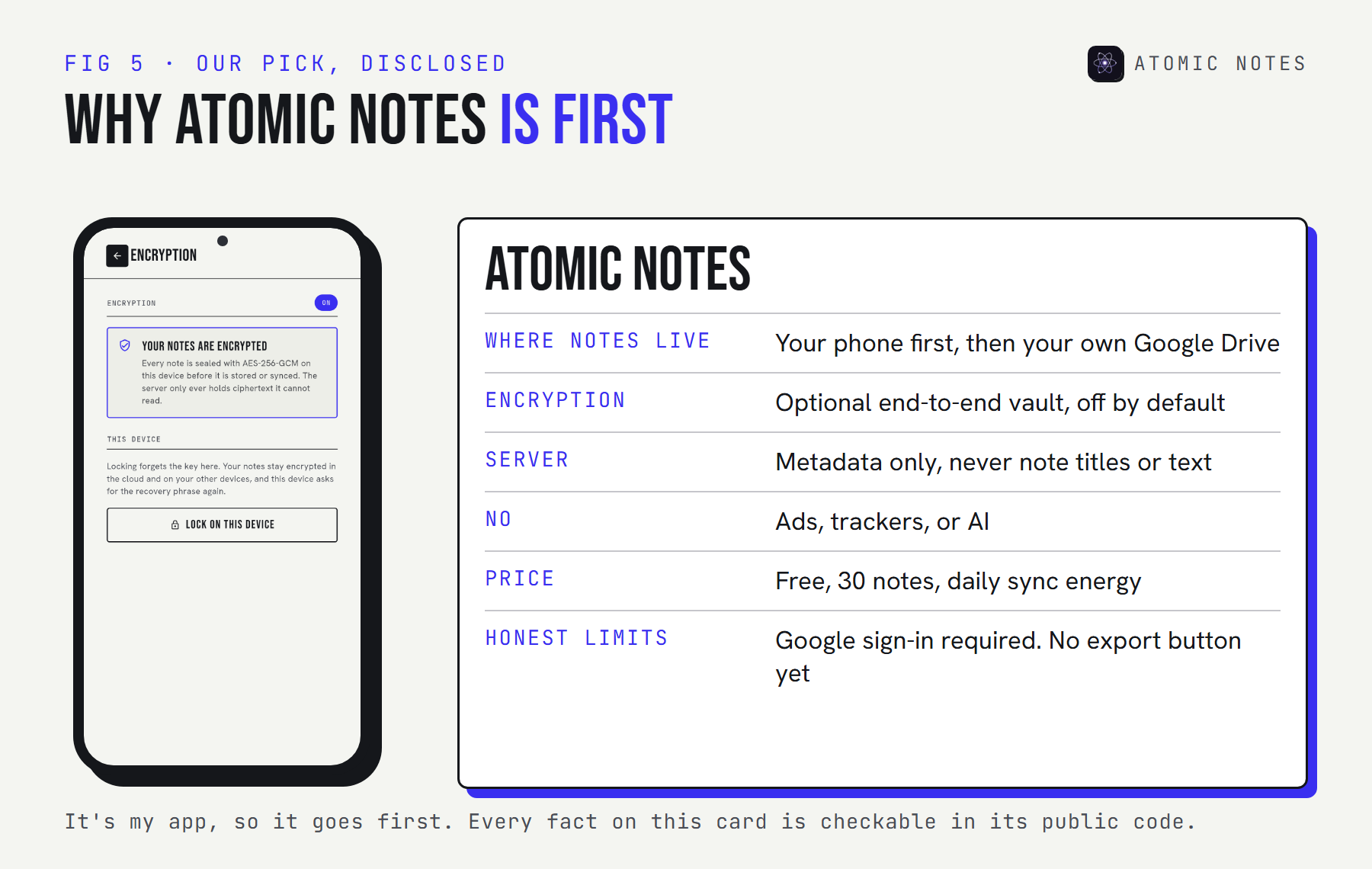
Atomic Notes is the private notes app Android users should reach for when they want sync but refuse to hand their writing to someone else's server. Its server tracks only metadata, and the files in your Drive are yours to open. The four-layer architecture guide shows exactly how.
2. SilentNotes
Pick it for: encryption you can't forget to turn on.
- Storage: on the device, with sync through FTP, WebDAV, Dropbox, Google Drive, or OneDrive, whichever you set up
- Protection: every note is encrypted before it leaves the phone, with no plain-text mode
- Tracking: the project says it gathers no user information
- Can reach: the internet and network state, for sync
- Source: open source under MPL-2.0
- Latest: version 8.8.7, October 5, 2026
- Trade-off: it runs on Android and Windows only, and the design is deliberately plain
You supply the cloud storage and SilentNotes seals each note before it gets there, so the storage provider holds only ciphertext. It also shipped a new release in October 2026.
3. CypherLeaf
Pick it for: a notebook that lives on one phone and stays there.
- Storage: device only, and you never create an account
- Protection: notes you mark as protected are sealed with AES-GCM, using keys kept in the Android Keystore. Backups are encrypted too.
- Tracking: nothing, and the app has no internet permission to send anything with
- Can reach: notifications, start at boot, and the biometric lock
- Source: open source under MIT
- Latest: version 1.0.1, which joined F-Droid on September 3, 2026
- Trade-off: it's very new, and there's no way to sync
Even at version 1.0.1, CypherLeaf covers folders, tags, reminders, and backups you can restore later.
4. NoteSR
Pick it for: keeping sensitive notes and the files that go with them in one sealed place.
- Storage: on the phone, with no account and no cloud of any kind
- Protection: notes and attachments are encrypted with AES-256, and exports stay encrypted
- Tracking: none, and no internet permission
- Can reach: storage access and a background service used for exports
- Source: open source under MIT
- Latest: version 5.6.0 on F-Droid
- Trade-off: it requires Android 10 or newer, and making backups is your job
Think of NoteSR as a safe for journals, scans, and documents. For anyone who never wants a cloud copy, it's the most secure notes app Android offers on this list.
5. Quillpad
Pick it for: writing in Markdown, with sync through a Nextcloud you run yourself.
- Storage: on the phone, plus optional sync to your own Nextcloud server
- Protection: no note encryption, though notes can be hidden from the main list
- Tracking: no ads and no trackers
- Can reach: the internet for Nextcloud, and the microphone for voice notes
- Source: open source under GPL-3.0
- Latest: version 1.5.14, September 3, 2026
- Trade-off: syncing requires the Notes app installed on your Nextcloud server
For Nextcloud owners, Quillpad makes private sync feel easy. Without Nextcloud, it still works as a clean offline Markdown notebook.
6. Fossify Notes
Pick it for: fast lists and notes pinned to your home screen.
- Storage: device only
- Protection: no encryption, but individual notes can sit behind a password, pattern, or fingerprint
- Tracking: no ads, and it can't go online at all
- Can reach: storage, alarms for reminders, and home screen widgets
- Source: open source under GPL-3.0
- Latest: version 1.7.0 from January 30, 2026, with code updates continuing through 2026
- Trade-off: minimal on purpose, and nothing syncs
Fossify Notes is the quickest route to a private checklist on your home screen. Fossify is a community project that continues the Simple Mobile Tools apps, without ads or tracking.
7. Notes (Privacy Friendly)
Pick it for: mixing typed notes, checklists, voice memos, and sketches with very few permissions.
- Storage: on the phone, with exports saved to device storage
- Protection: none built in
- Tracking: no ads, and no internet permission
- Can reach: the camera and microphone, used only for photo and audio notes
- Source: open source under GPL-3.0
- Latest: version 2.2.2, June 15, 2026
- Trade-off: there's no sync and no encryption
It comes from the SECUSO research group at the Karlsruhe Institute of Technology, which publishes a whole family of Privacy Friendly Apps.
Which private notes app for Android fits you?
Start with one question: do you need sync? If you don't, the four offline-only apps give you the smallest possible footprint. If you do, choose by where the synced copy lives.
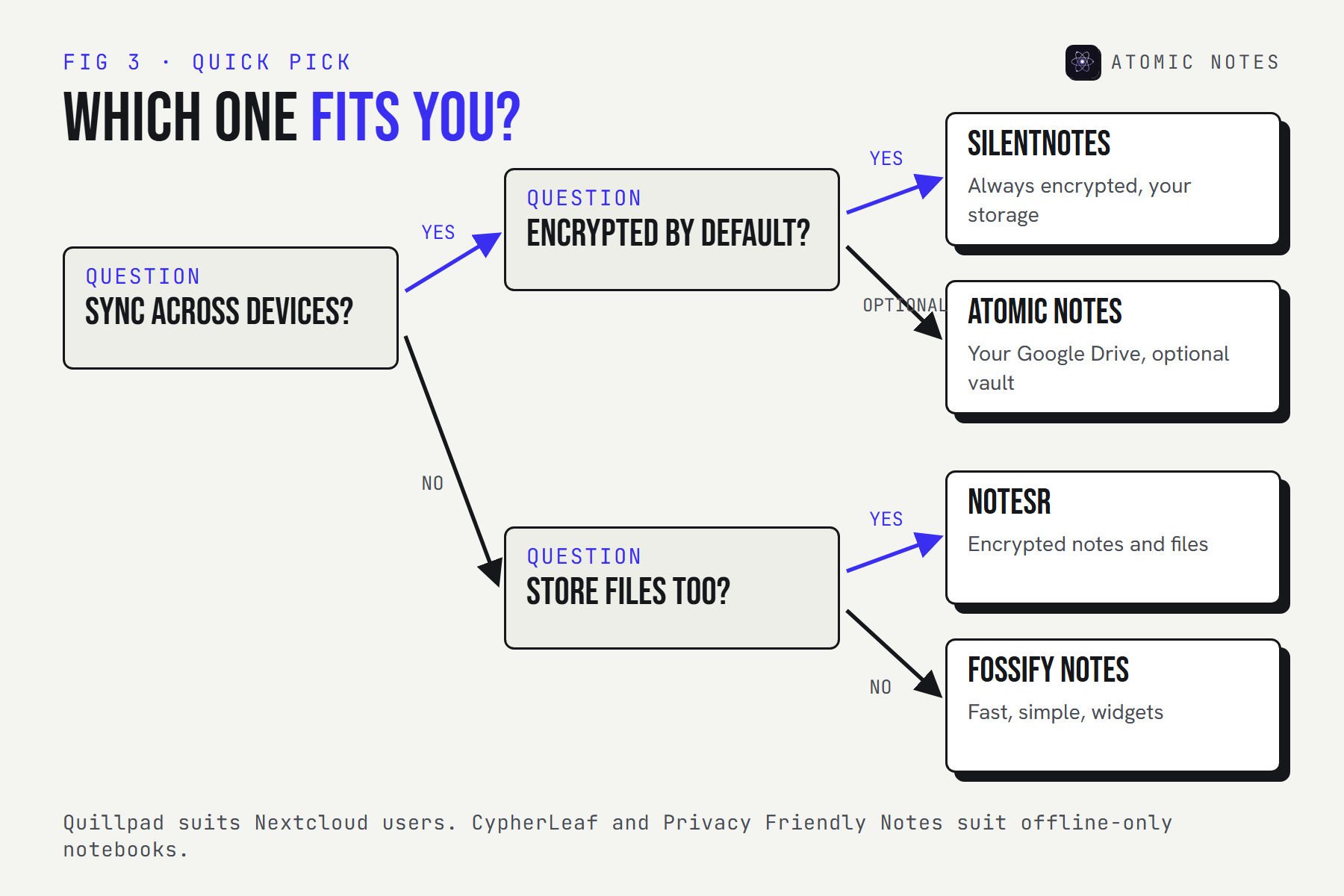
| If you want | Pick |
|---|---|
| Sync to storage you own, with an optional vault | Atomic Notes |
| Encryption that's always on, plus sync | SilentNotes |
| Encrypted notes and files, never online | NoteSR |
| A new offline notebook with locked notes | CypherLeaf |
| Markdown and your own Nextcloud | Quillpad |
| Fast checklists and widgets | Fossify Notes |
| Audio and sketch notes, few permissions | Notes (Privacy Friendly) |
Which apps can even reach the internet?
Four of the seven can't. An app without the internet permission has no way to send your notes anywhere by itself. That's the strongest privacy guarantee Android offers, and it's checkable.
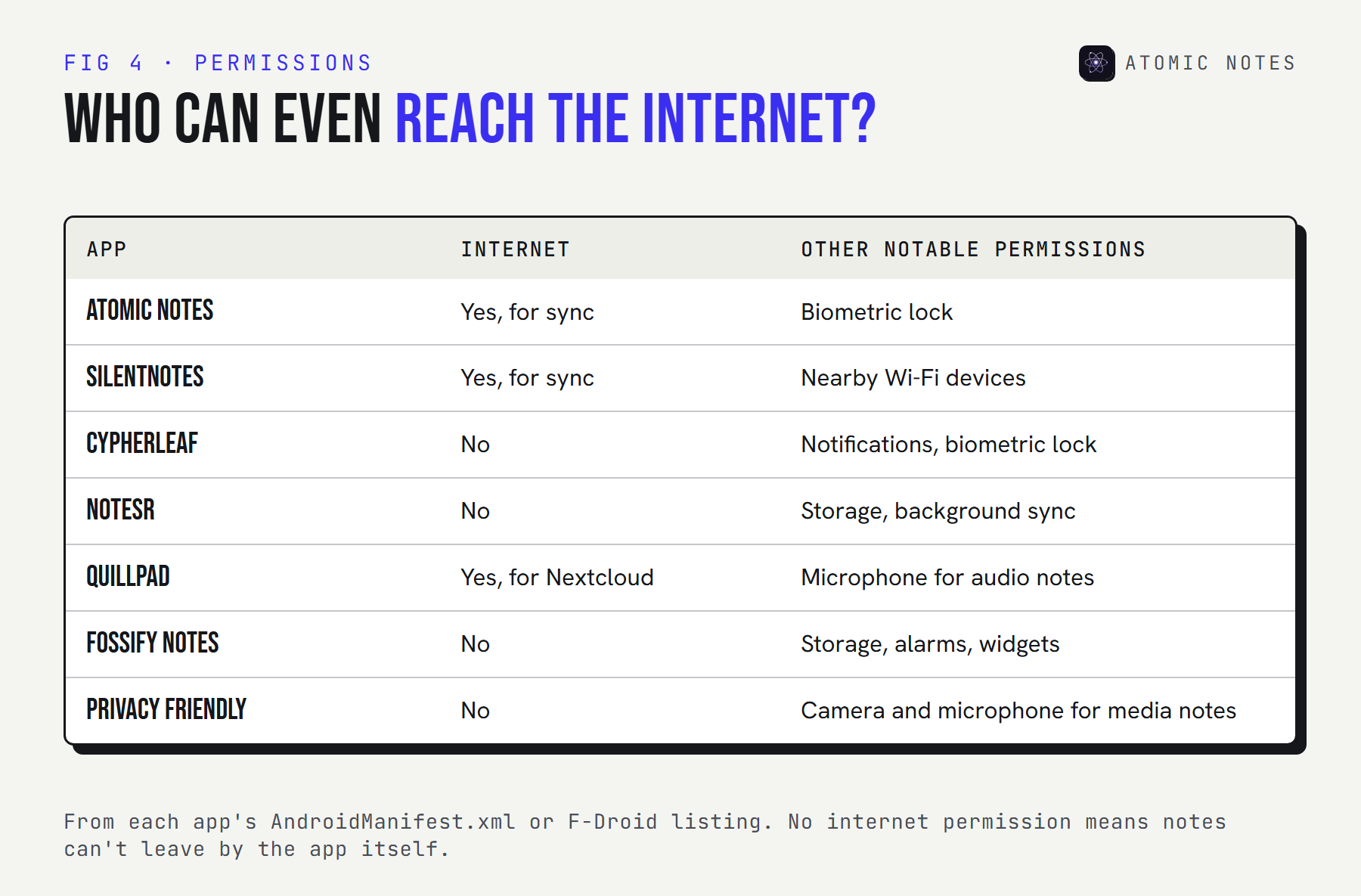
The trade is the same every time: no internet means no sync and no cloud backup. If you pick an offline-only app, copy its export to a safe place now and then. If you pick a syncing app, check where the synced copy lives and who holds its key. That's the real difference between a secure notes app Android users can trust and one that only says so. My notes app privacy checklist covers the other eight things to check.
Why aren't Google Keep, Notesnook, or Standard Notes here?
Google Keep fails the rules: notes live in your Google account, readable by Google, with no end-to-end encryption. It's convenient, not private by design.
Notesnook, Standard Notes, and Joplin are excellent encrypted apps with encrypted sync. They're cross-platform first rather than Android-first, and they have their own spot in my guide to end-to-end encrypted notes apps, so this list stays unique.
FAQ
What is the best private notes app for Android?
For sync you control, Atomic Notes, which saves to your own Google Drive with an optional vault. For always-on encryption, SilentNotes. For notes that never leave the phone, NoteSR. All three have no ads, no trackers, and public code.
Are F-Droid notes apps always private?
Mostly, though it's worth a look. F-Droid compiles each app from its public code and labels anti-features such as tracking. The permission list is the final word: with no internet permission, an app has no way to send your notes off the phone.
Does a private notes app need encryption?
For notes that stay on the phone, your screen lock already does most of the work. The moment notes sync to a cloud, encryption becomes important, because end-to-end encryption is what stops the storage provider from reading the copy it holds.
Which Android notes apps work without internet?
CypherLeaf, NoteSR, Fossify Notes, and Privacy Friendly Notes have no internet permission at all. Atomic Notes, SilentNotes, and Quillpad work fully offline too, and sync when a connection returns.
Are free private notes apps safe?
Free isn't the risk. Ads and analytics are. Every app here is free to use, and none shows ads or ships trackers. The open source apps here are community or research projects, and Atomic Notes is funded by the people who use it.
Why is Atomic Notes first on this list?
Because it's my app, and I'd rather say so than hide it. Every fact on its card is checkable in its public source code, and its limits are listed: a Google account is required, there's no export button yet, and the free tier holds 30 notes.
Keep reading
- Notes app privacy: 9 red flags to check
- Encrypted notes explained: T2T vs end to end encryption
- What is a local first notes app?
- 8 best offline notes apps for Android
Atomic Notes by DevBehindYou
A private notes app for Android that keeps your notes on your phone and in your own Google Drive, never in our database. No ads, no trackers, no AI, and an optional end-to-end vault. See how it works.