 ATOMIC NOTES
Quick answer
A local first notes app saves every note to your own device first and treats the cloud as a copy. Writing never waits for a server, works with no signal, and keeps your notes readable if the company behind the app disappears. Sync still exists. It just stops being the boss.
Picture a train heading into a tunnel. You open your notes app, the signal drops, and a spinner sits where your idea should go. By the next stop, the thought is gone. That tiny failure is the best argument for a local first notes app.
Most notes apps treat your phone as a window onto someone else's server. A local first notes app flips that order. The device holds the real copy, and the cloud follows behind.
I build Atomic Notes, a local first notes app for Android, so I live with these details every day. This guide covers what the term means, how it differs from "works offline", what it costs, and how to test any app in five minutes.
What does local first mean?
The local first meaning, in one sentence: the copy of your data that matters most lives on your device, and every other copy is a replica. The app reads and writes locally, then syncs when it can.
The phrase comes from a 2019 essay by the research lab Ink & Switch, written by Martin Kleppmann, Adam Wiggins, Peter van Hardenberg, and Mark McGranaghan. They called the idea local-first software and set out seven ideals for it. Their argument was simple. Cloud apps made collaboration easy, but they quietly took ownership away from the people doing the work.
For notes, the local first meaning gets very concrete:
- The save button, or the autosave, finishes on your phone. It never waits on a round trip.
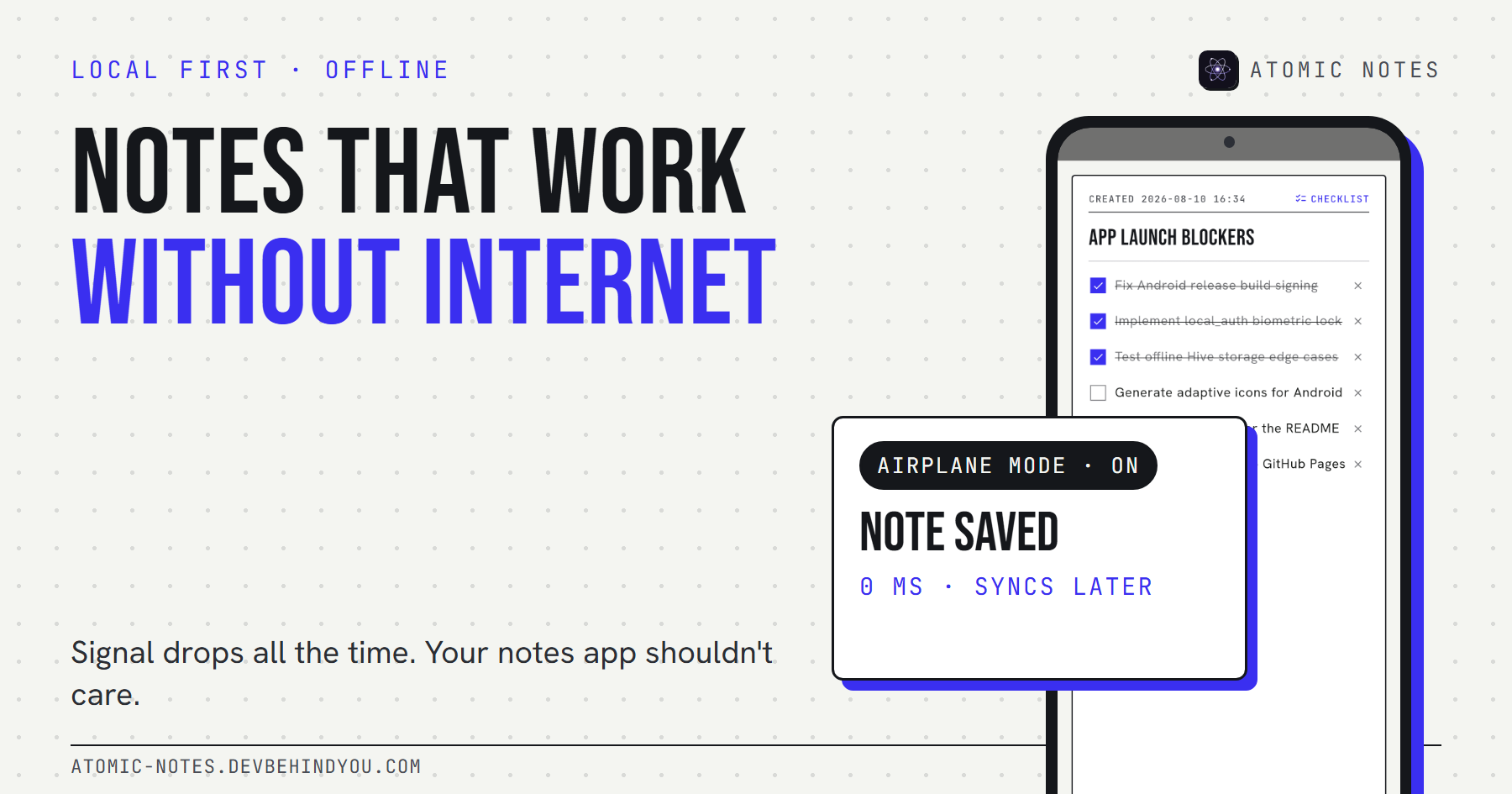
- Everything you do daily works in airplane mode, writing included.
- Your notes exist in a place you control, so the app can't hold them hostage.
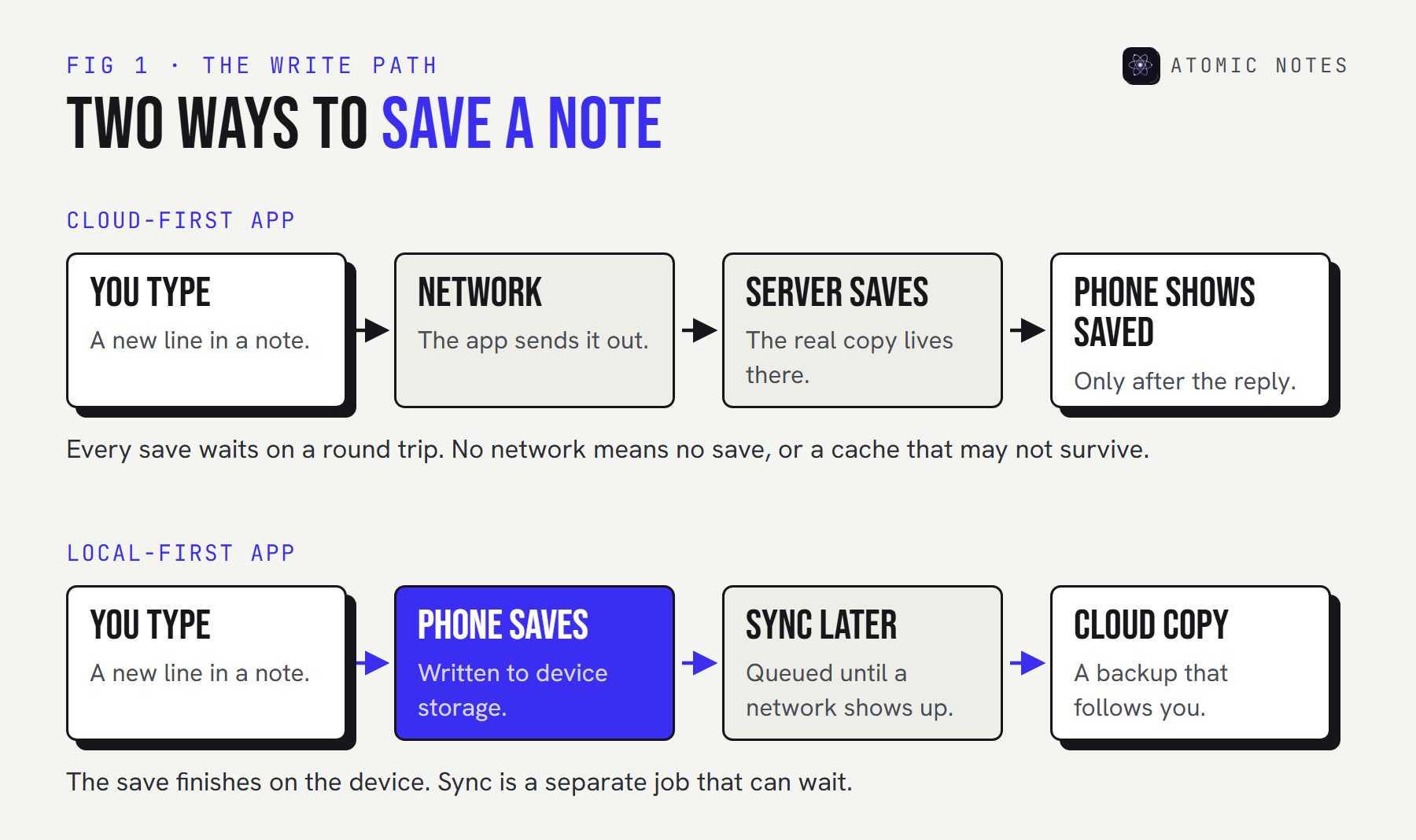
The difference looks small on a diagram. In daily use, it decides whether your notes app ever makes you wait.
Is a local first notes app just an offline mode?
No. Offline mode is a feature. Local first is an architecture. An offline mode usually means a cache: recent notes kept around so you can read them when the network drops. A local first notes app keeps the authoritative copy on the device, so offline is simply the normal state with nothing to sync. Offline capability falls out of the design instead of being bolted on. That's the local first meaning in practice.
That distinction shows up the moment something goes wrong. In a cache-based app, a new note written offline often sits in a temporary queue. If the app crashes or the cache clears, that note can vanish. In a local first notes app, the note is already saved. Sync is the only thing waiting.
For a hands-on test of your own app, see why notes should work without internet. There's a middle ground called offline first. Writes queue on the device, but the server's copy still wins any disagreement when you reconnect. It's a big step up from a plain cache, yet the server remains the source of truth.
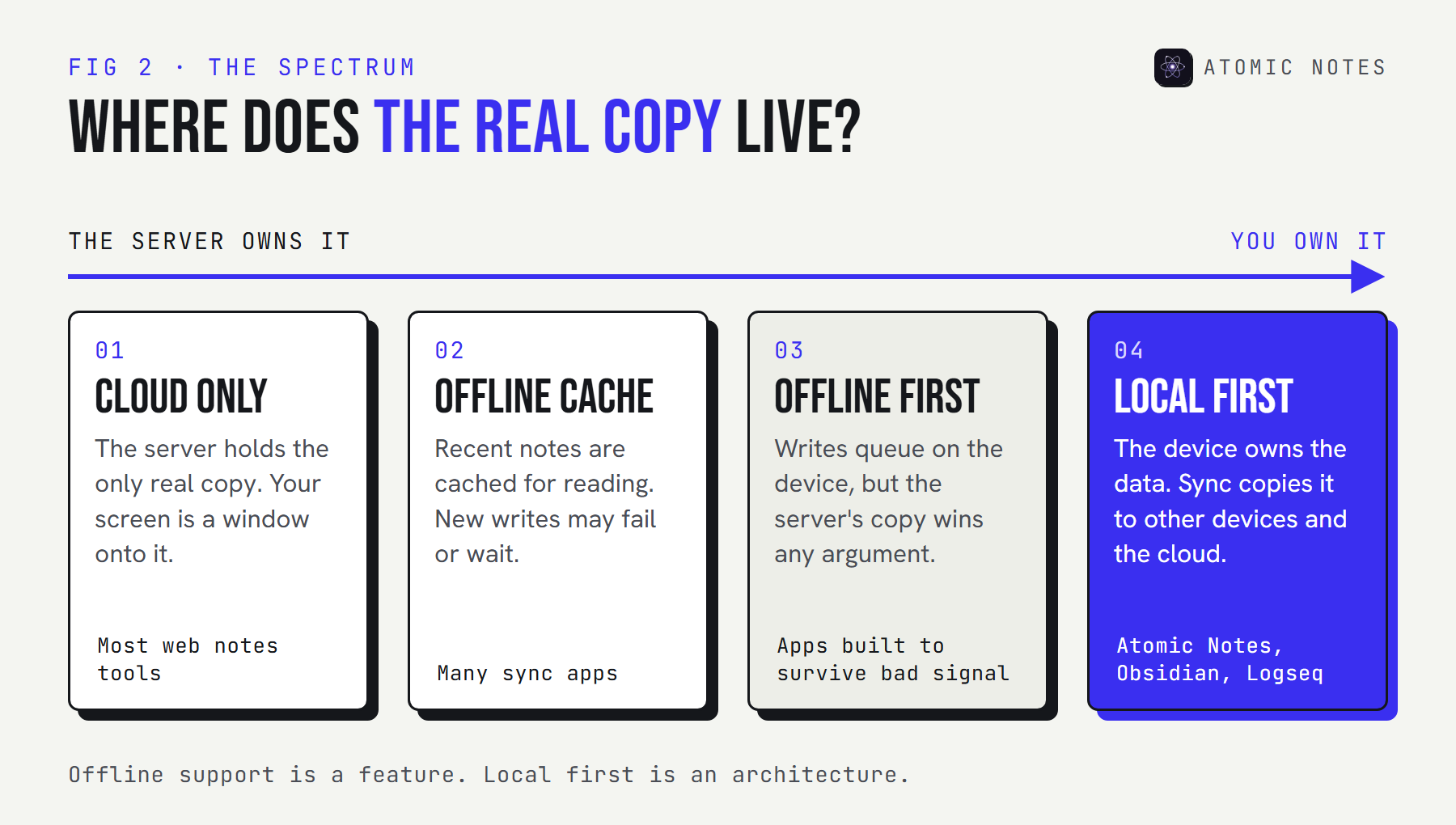
Here's how the four models compare on the things you'll actually notice:
| Model | Where the real copy lives | Write with no signal | If the company shuts down |
|---|---|---|---|
| Cloud only | The server | No | Notes may vanish with it |
| Offline cache | The server | Sometimes, if the cache holds | Notes may vanish with it |
| Offline first | The server, with a local queue | Yes, queued | Whatever was synced or exported |
| Local first | Your device | Yes, saved | Everything on your device stays |
Try the difference yourself. Save a note, switch the network off, and save another.
TRY IT · THE NETWORK SWITCH
Turn the network off. Keep writing.
Type a note and press save. Then switch the network off and save again.
CLOUD-FIRST APP
No offline cache. The server is the source of truth.
- No notes yet.
LOCAL-FIRST APP
The device is the source of truth. The cloud is a copy.
- No notes yet.
Why does a local first notes app matter?
Because your notes are personal, long-lived, and written at awkward moments. Those three facts favor a local first notes app over a cloud-first one every time.
Your notes stay fast
A local first notes app writes in milliseconds. A cloud write takes a round trip, and round trips stretch on weak signal. The Ink & Switch essay calls this ideal "no spinners." Once you've used an app that never shows one, the others feel broken.
Your notes survive other people's outages
On October 20, 2025, a failure in Amazon Web Services' US-East-1 region took down DynamoDB and cascaded into many of the apps built on top of it. Recovery took most of a day. Cloud dependency doesn't just mean your own connection. It means every server between you and your notes. A local first notes app keeps working through all of it, because nothing it needs to show you lives far away.
Your notes outlive the app
Companies pivot, get acquired, and shut down. When a cloud-only notes service closes, its users get an export window, if they're lucky. Notes stored on your device and in storage you control don't depend on anyone's roadmap. That's user control in its plainest form. The essay calls this longevity ideal "the long now," and it matters more for notes than for almost any other kind of data, because notes are where you keep the things you meant to remember for years.
Privacy gets easier
When the device holds the real copy, the server doesn't need to read your notes to show them to you. That makes end-to-end encryption a natural fit instead of a bolt-on. It also shrinks what a breach can expose. Local-first software doesn't guarantee privacy on its own, but it removes the main excuse for collecting your content.
The seven ideals of local-first software
The essay's seven ideals are the best checklist I know for judging any local first notes app. Use them as questions, not marketing badges.
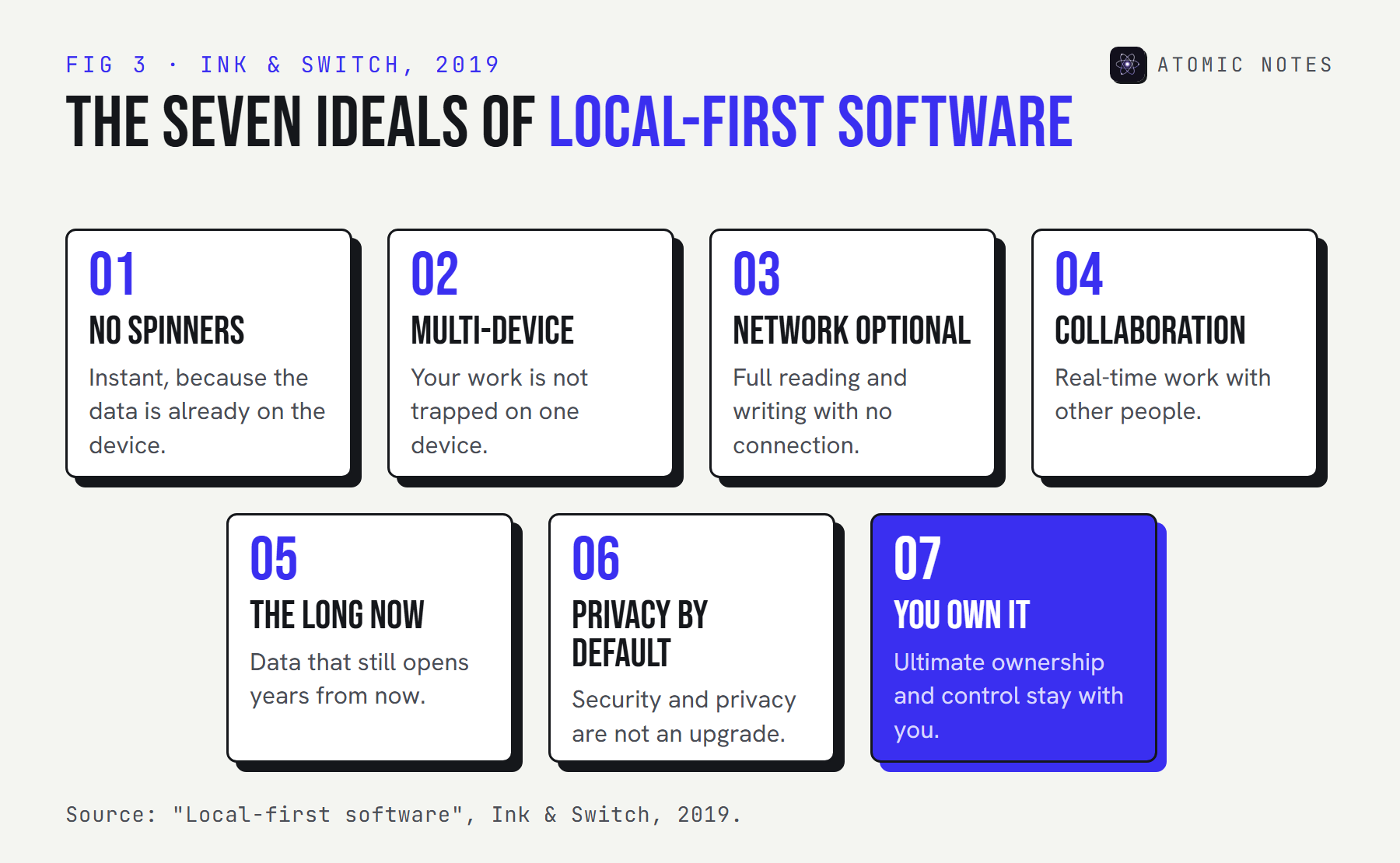
No app scores a perfect seven, including mine. Collaboration is the hardest ideal for a small team, because real-time co-editing needs a CRDT or a similar conflict-free data structure. Atomic Notes is a personal notes app, so it skips that ideal on purpose and says so.
Score the app you use today against what a local first notes app should do. You can reveal how Atomic Notes answers, gaps included.
SELF-TEST · THE SEVEN IDEALS
How local-first is your notes app?
Answer for the app you use today. Ink & Switch lists these seven ideals for local-first software.
- 01
It opens and saves instantly, with no spinner while it waits for a server.
- 02
Your notes are not trapped on one device.
- 03
It works fully with the network off.
- 04
You can collaborate with other people in real time.
- 05
Your notes will still open in ten years, even if the company is gone.
- 06
It is private and secure by default.
- 07
You keep final ownership and control of your notes.
0 / 7 7 left to answer
How a local first notes app actually works
Three parts do the work: on-device storage, a sync engine, and a cloud copy. The interesting engineering is in how they talk to each other when the network is unreliable. The full architecture guide goes layer by layer.
Here's how Atomic Notes splits those jobs:
- Your phone holds the real copy. Every note saves to on-device storage (Hive) as you type, online or not. Search, edit, and delete all run against that local copy.
- A sync server coordinates, and keeps metadata only. It tracks note IDs, timestamps, flags, and versions so your devices agree. It never stores your note titles or text.
- Your own Google Drive holds the cloud copy. Every note lands in a My-Atomic-Notes folder as its own
.atomicfile. The app uses Google's narrowdrive.filescope, so it can only see files it created.
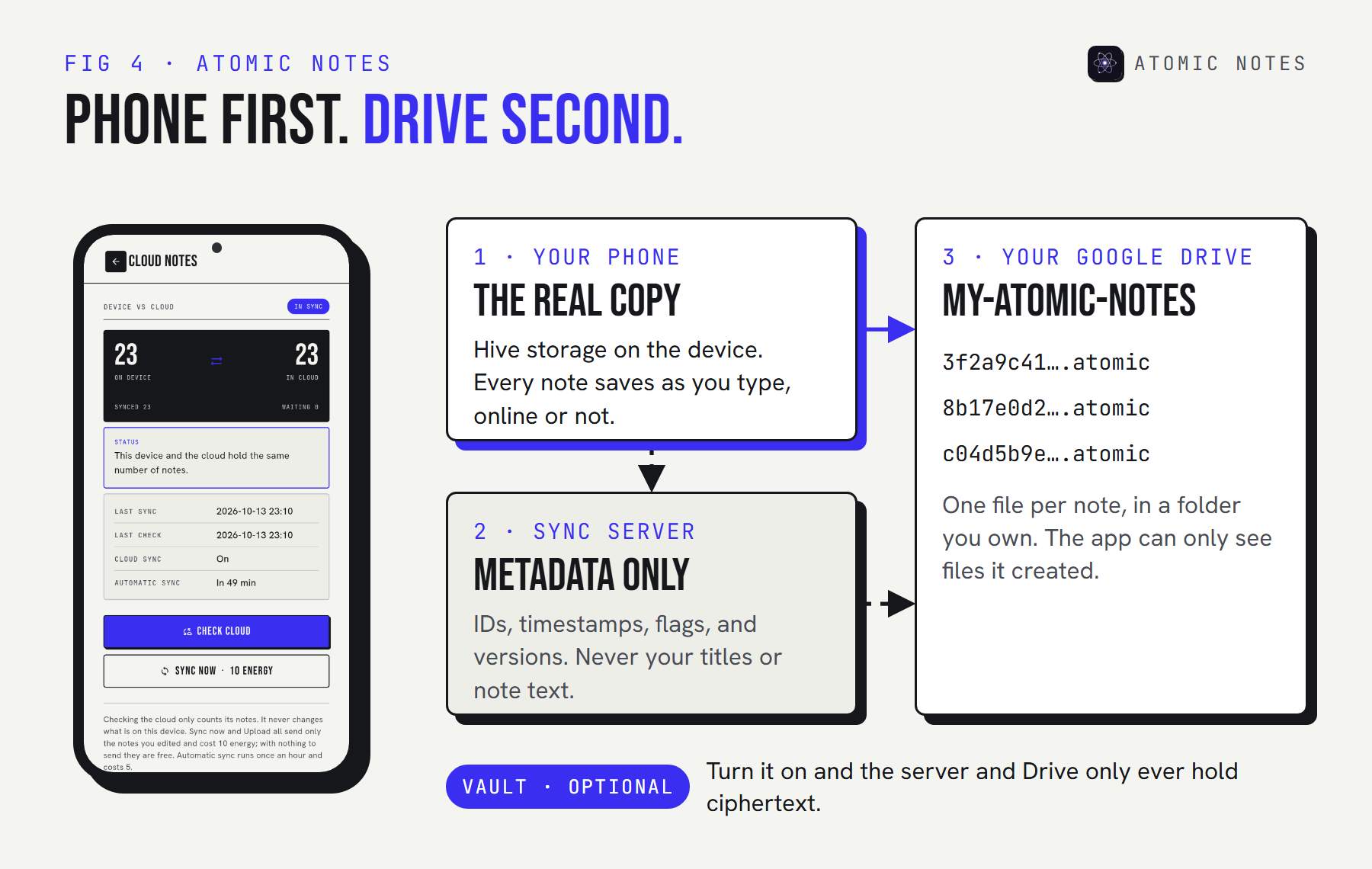
One honest detail. Unless you turn on the optional vault, note text is plain JSON in your Drive and passes through the sync server on its way there, without being stored. Turn the vault on and your phone encrypts every note with AES-256-GCM before upload, so the server and Google only ever hold ciphertext.
Here's what "the save is the device write" looks like in real code. This is the save path from the Atomic Notes source, trimmed, with comments added:
lib/database/notes_repository.dart · Atomic Notes 2.03.5
@override
Future<void> save(Note note) async {
  note.touch();            // stamp the edit time and mark the note "dirty"
  note.settleDirty();      // an edit undone back to the synced copy needs no upload
  _notes[note.id] = note;
  await _persist(note.id); // the save finishes here, on the device
  notifyListeners();       // the screen updates right away
  if (note.dirty) _scheduleAutoSync(); // the network comes later, if at all
}
Notice what isn't there: no network call, no spinner, no error path for "server unreachable." The sync engine picks up dirty notes about eight seconds after you stop typing, on app resume, and when the network comes back. If two devices edit the same note while offline, the server rejects the out-of-date edit, and your phone saves it as a separate conflict copy. Nothing gets overwritten.
What does local-first software cost you?
Local first moves the hard work from the server into the sync engine. That trade is worth it for notes, but it isn't free, and an honest local first notes app should tell you where it bends.
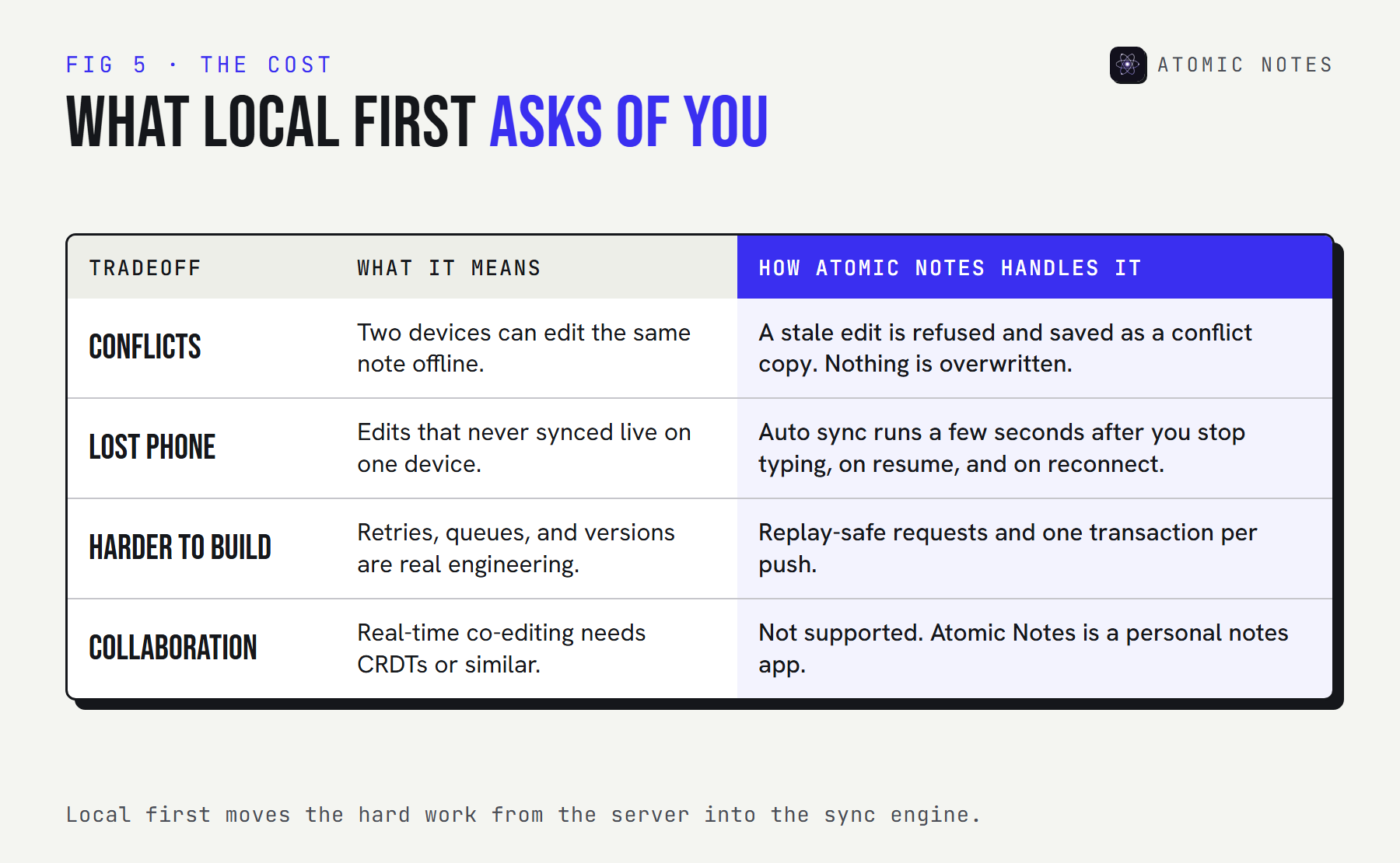
- Conflicts. Two devices can change the same note offline. The app needs a rule for that moment, and "last write wins" quietly throws work away.
- A lost phone. Edits that never synced exist on one device only. Frequent automatic sync shrinks that window, but it can't close it entirely.
- Harder engineering. Retries, queues, versions, and replay-safe requests take real work. Some apps call themselves local-first without doing it.
- Collaboration. Real-time shared editing is still the frontier of local-first software, and most personal notes apps, mine included, don't offer it yet.
My opinion after building one: for personal notes, these costs are small next to a notes app that freezes on a train. For a team wiki, the math is different.
How to tell if your notes app is really local first
You don't need to read code. Give any app five minutes and these four checks:
- The airplane test. Turn on airplane mode, force-close the app, and reopen it. Create a note, edit an old one, search, and delete. Everything should work, with no error and no spinner.
- The restart test. Still offline, restart your phone. Your offline edits should all still be there.
- The reconnect test. Turn the network back on. Your offline changes should sync on their own, without a manual retry.
- The exit test. Find out where your notes physically live and in what format. If the only answer is "our servers," the app is cloud first, whatever its marketing says.
If an app passes all four, you're using a local first notes app. If it fails the first one, you're using a web page with an icon.
Local first is also one of the strongest privacy signals a notes app can send. For the rest of that picture, read notes app privacy: 9 red flags to check.
FAQ
Is a local first notes app the same as an offline notes app?
Not exactly. An offline notes app may only cache recent notes and queue new ones for the server. A local first notes app keeps the real copy on your device, so offline isn't a special mode. It's the normal state, and sync catches up later.
Can a local first notes app still sync between devices?
Yes. Local first doesn't mean local only. The device holds the authoritative copy, and a sync engine copies changes to the cloud and your other devices. Atomic Notes syncs each note to a folder in your own Google Drive.
What happens to my notes if a local first app shuts down?
Your notes stay on your device, and any synced copies stay wherever they were stored. If that storage is yours, like your own Google Drive, the files remain readable. A cloud-only app can take your notes with it when it closes.
Is local-first software more private?
It makes privacy easier, not automatic. When the device holds the real copy, the server doesn't need to read your notes, so end-to-end encryption fits naturally. You still need to check for trackers, ads, AI processing, and what the sync server keeps.
Does Atomic Notes work without internet?
Yes. Writing, editing, searching, and deleting all work offline, because every note saves to on-device storage first. Sync to your Google Drive runs when a connection returns. Signing in for the first time does need a connection.
Keep reading
- Notes app without internet: why offline should be the default
- Local first architecture: the 4 layers behind Atomic Notes
- Notes app privacy: 9 red flags to check before you trust one
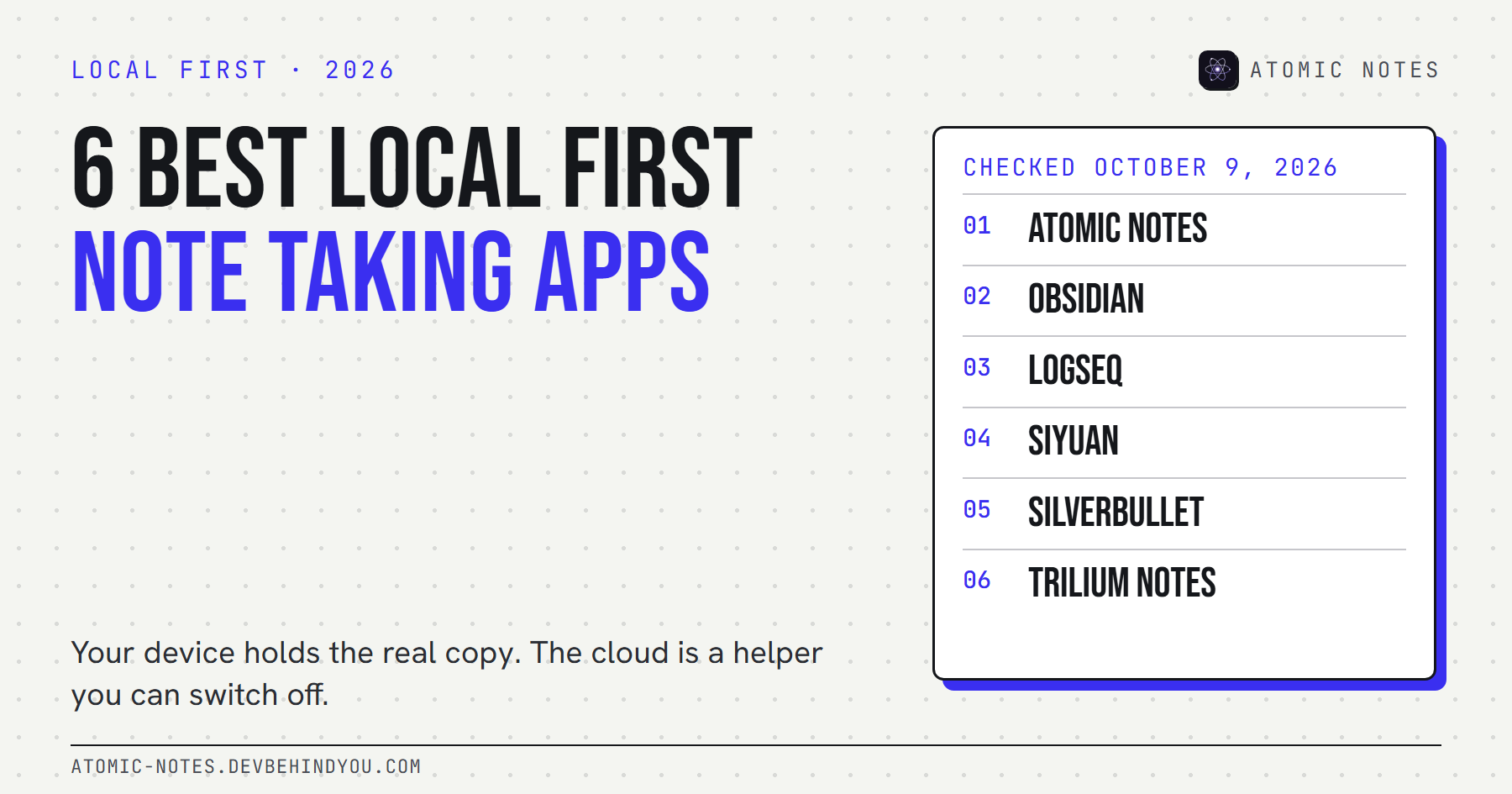
- 6 best local first note taking apps, compared
- The Atomic Notes source code on GitHub, public to read and verify
Atomic Notes by DevBehindYou
A source-available, local first notes app for Android. Notes save on your phone first and sync to your own Google Drive. No ads, no trackers, no AI, and an optional end-to-end vault. See how it works.