 ATOMIC NOTES
Quick answer
Notes app metadata is everything around your notes: your email, IP address, device, sign-in times, sync activity, how often you open the app, and when notes change. None of it needs a word of what you wrote, yet together it can reveal your routine, your location, and your life events. Encryption hides content. Only collecting less hides metadata.
"Metadata absolutely tells you everything about somebody's life." That's Stewart Baker, a former general counsel of the NSA, as quoted by law professor David Cole in 2014. He meant it as a plain description of how surveillance works.
Notes apps don't run spy agencies. But every one that syncs keeps some notes app metadata, and most keep more than they need. That data sits in logs and analytics tools long after you forget the note.
I build Atomic Notes, so I've had to decide what our own server keeps. This guide covers the eight kinds of metadata a notes app can know about you, what each one reveals, which ones a sync service actually needs, and how to check any app.
What is notes app metadata?
Metadata is data about your notes, not the notes themselves. If content is the letter, metadata is the envelope: who sent it, when, from where, and how heavy it was.
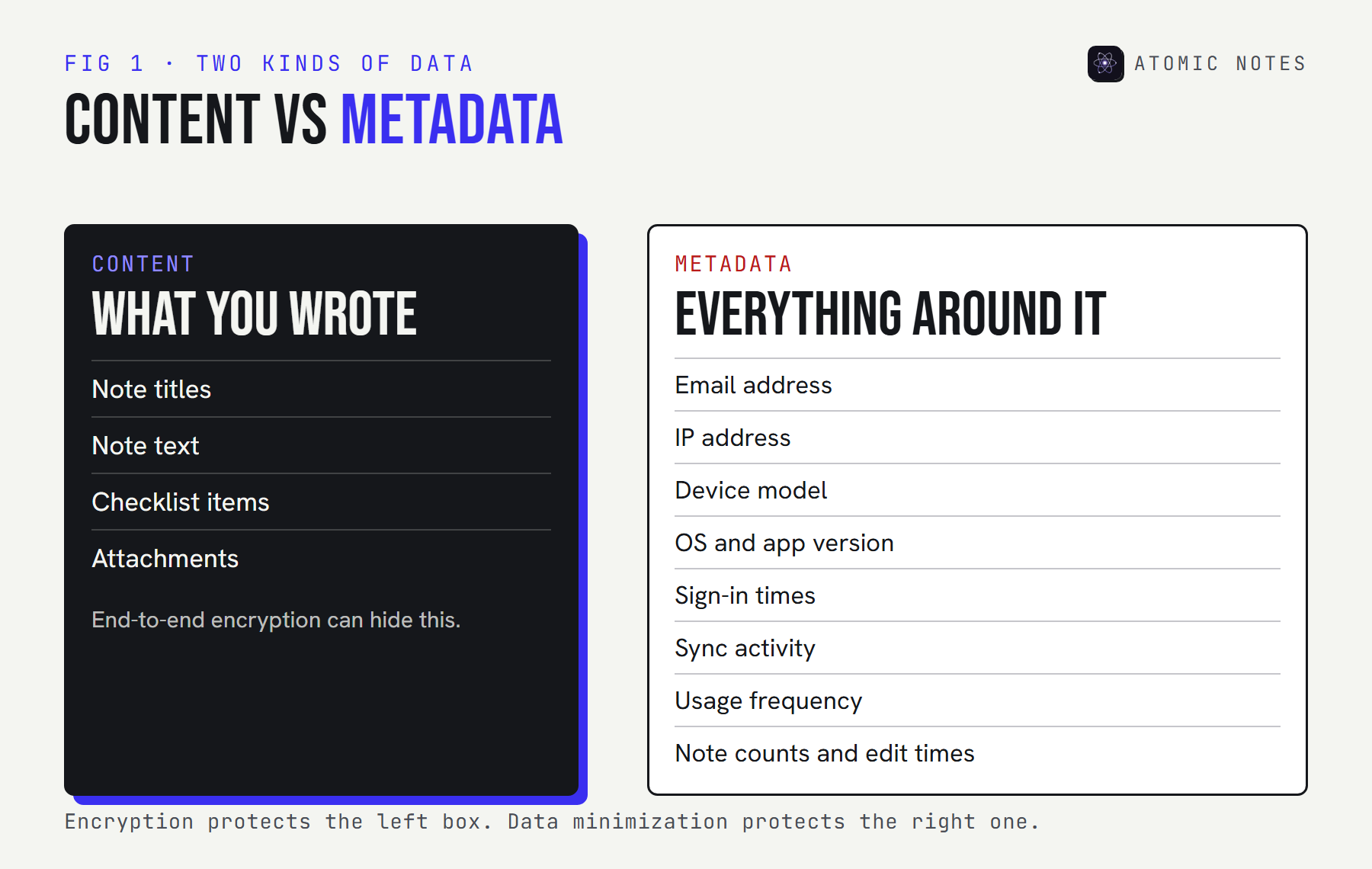
This split matters because the two are protected in different ways. End-to-end encryption can make your note text unreadable to the company. It does nothing for notes app metadata, because the server needs some of it just to sync. The only protection for metadata is a company that collects little, keeps it briefly, and tells you exactly what it keeps.
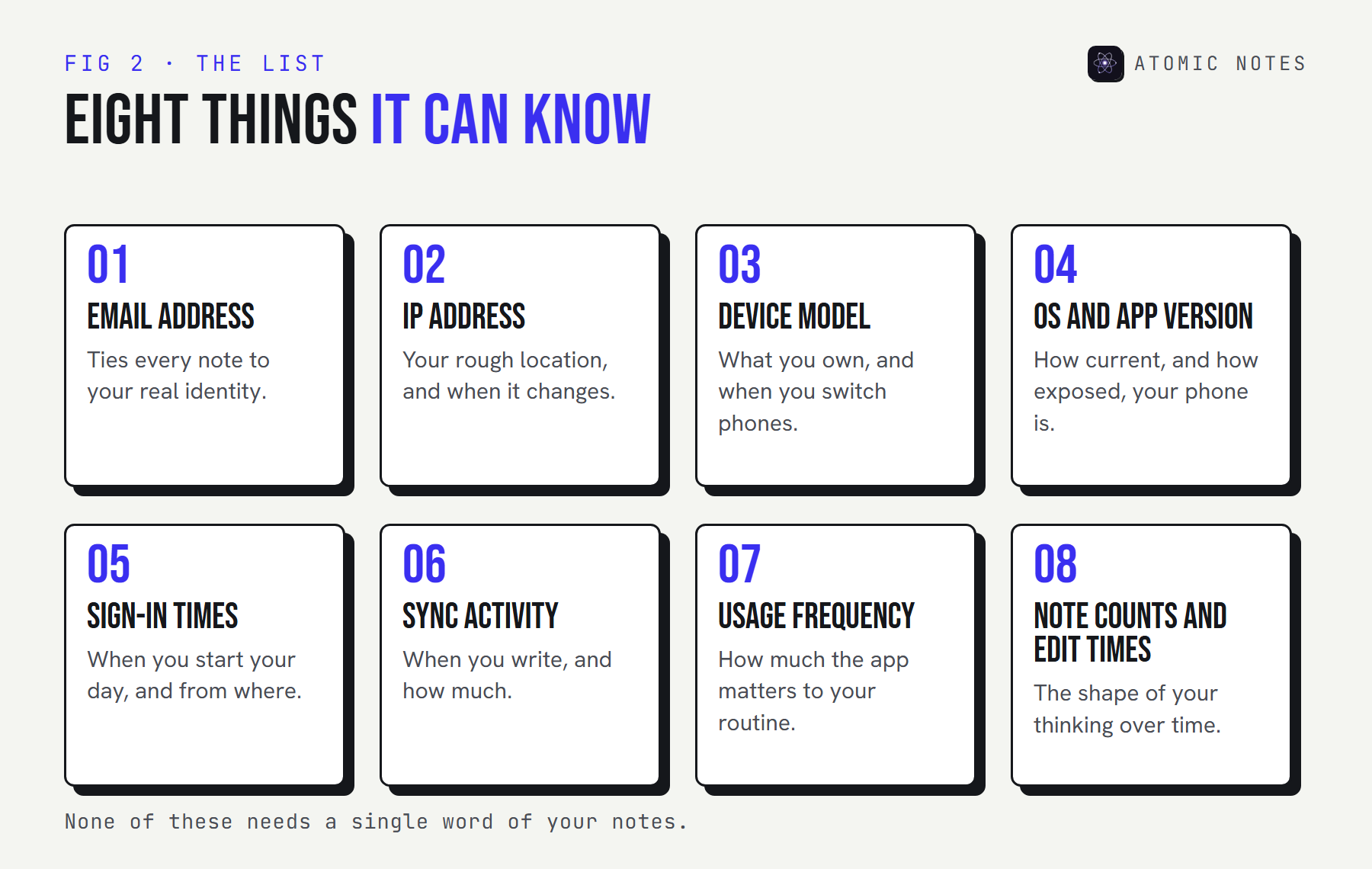
The 8 things a notes app can know without reading your notes
1. Your account email
Almost every syncing app needs an account email, and it ties every other piece of notes app metadata to your real identity. Ask whether it's ever shared, and whether deleting your account deletes it.
2. Your IP address
Every request carries one, so the server sees it whether it wants to or not. IP address tracking reveals your rough location and when it changes. The question is how long the app keeps it, and whether it lands in analytics.
3. Your device model
Device information helps spot a suspicious sign-in. It also reveals what you own and when you switch phones. Combined with screen size, fonts, and settings, it can feed device fingerprinting, which identifies you without any cookie.
4. Your OS and app version
Useful for support, and harmless on its own. It also shows how current your phone is, which can hint at how exposed it is to known bugs.
5. Your sign-in times
Login activity shows when your day starts and from where. A new sign-in from a strange country is worth flagging. A full history of every sign-in is worth questioning.
6. Your sync activity
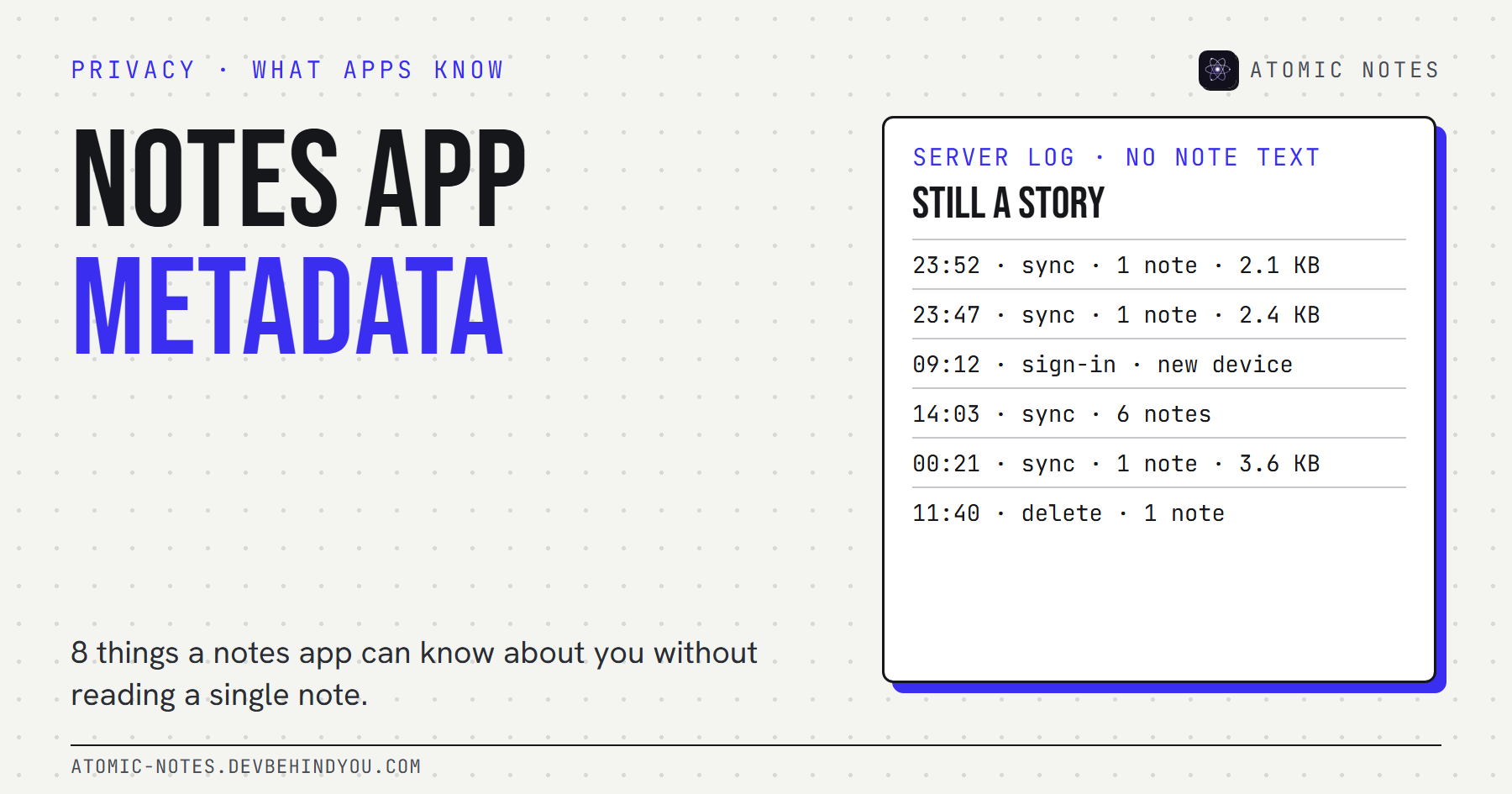
Sync metadata says when you write and how much. A sync at 23:52 every night is a habit. A burst of small notes from a hospital network on a Thursday afternoon is a story.
7. How often you use the app
Usage analytics, the screens you open and how long you stay, is the most common extra a notes app collects. It powers product dashboards. It isn't needed to sync a single note.
8. Your note counts and edit times
How many notes you have, when each one changed, and roughly how big it is. Even when every note is encrypted, this part of notes app metadata shows the shape of your thinking over time.
What can notes app metadata reveal?
More than any single note. One timestamp means nothing. A month of them is a diary of your habits. Click through the example below. It's a made-up week of sync events, the kind a server could log, with zero note content.
TRY IT · NO CONTENT, STILL REVEALING
A week of metadata. Zero note text.
This is a made-up log of the kind a sync service could keep. Not one word of any note is in it.
| WHEN | EVENT | WHERE (FROM THE IP) |
|---|---|---|
| MON 23:52 | sync push · 1 note · 2.1 KB | home Wi-Fi |
| TUE 23:47 | sync push · 1 note · 2.4 KB | home Wi-Fi |
| WED 09:12 | sign-in · new device · Pixel 8 | office network |
| WED 23:58 | sync push · 1 note · 2.9 KB | home Wi-Fi |
| THU 14:03 | sync push · 6 notes · 0.4 KB each | hospital guest Wi-Fi |
| FRI 00:21 | sync push · 1 note · 3.6 KB | home Wi-Fi |
| SAT 11:40 | delete · 1 note | airport Wi-Fi |
0 / 5 inferences revealed
Now picture that pattern as a chart. This is the kind of view anyone with access to the logs could build in a few minutes:
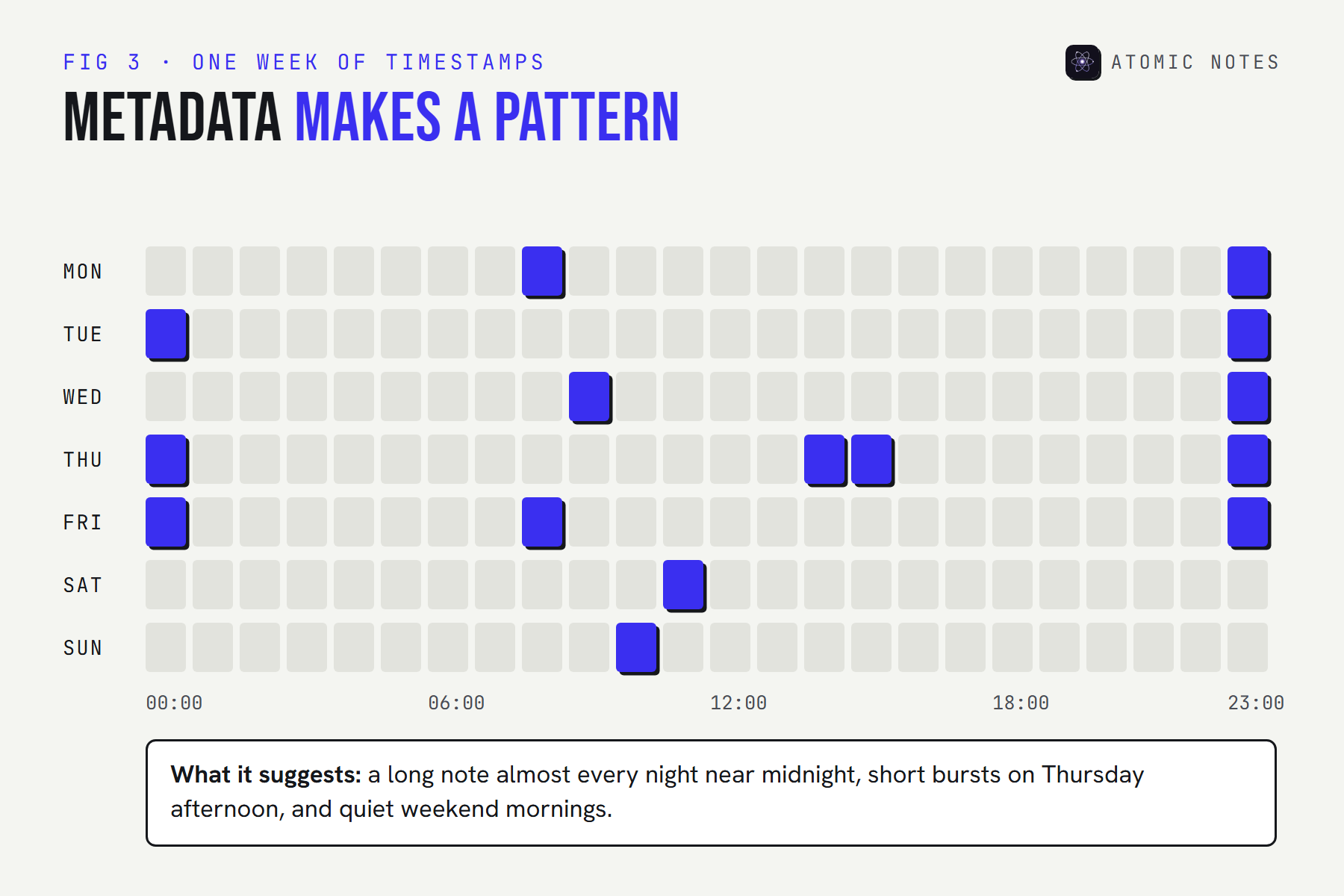
The EFF gives a blunt example: call metadata can show that someone spoke with an HIV testing service, then their doctor, then their health insurer within the same hour, without anyone hearing a word. Notes app metadata works the same way. The when and where often tell the story the what was meant to keep private.
Which notes app data collection is actually necessary?
A sync service needs a little metadata. Everything past that is a business decision. This is the principle of data minimization, written into Article 5 of the GDPR: collect only what you need, for a stated purpose, and keep it only as long as you need it.
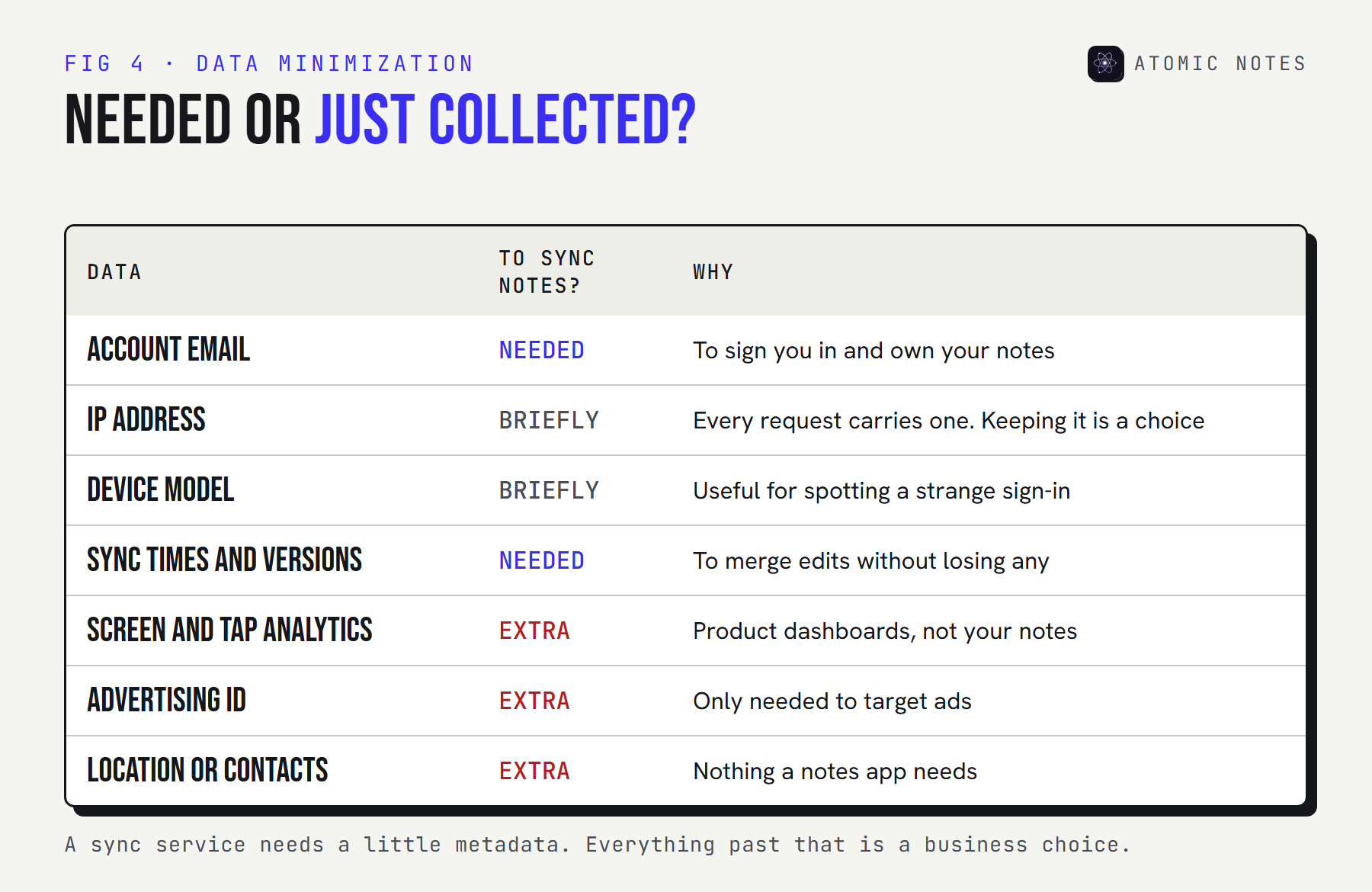
Here's the practical test. For every piece of data, ask two questions: would sync break without it, and how many days is it kept? A good answer names a retention period. "As long as necessary" isn't a number.
| Ask the app | A good answer sounds like |
|---|---|
| What do you store about each note? | "IDs, timestamps, and sync versions. Never the text." |
| Do you keep IP addresses? | "Only in request logs, deleted after a fixed number of days." |
| Which analytics do you run? | "None in the app," or a named, privacy-friendly tool. |
| How long do you keep logs? | A specific retention period, like 30 days. |
| What happens when I delete my account? | "Everything tied to it is deleted," with a timeline. |
How do you check what a notes app collects?
Read three things, and ask for a fourth. Mapping an app's notes app metadata takes about fifteen minutes.
- The store label. Google Play's data safety section lists what the developer says is collected. It's self-declared, so treat it as a starting point. My notes app privacy guide explains why.
- The privacy policy. Search for "collect," "analytics," "third parties," "retain," and "IP." Vague phrases usually mean more collection, not less.
- A tracker scan. Exodus Privacy lists the analytics and advertising SDKs inside an Android app. Usage analytics almost always arrives through one of these.
- Your own data. In many places, privacy law lets you ask a company for a copy of what it holds about you. The answer often shows server logs nobody mentioned.
Why do notes apps collect more than they need?
Because metadata is cheap to keep and useful to almost every team except yours. Product teams want usage analytics to see which features people use. Growth teams want device and location data to measure campaigns. Support wants long logs for the rare hard bug. Advertising, if the app has any, wants all of it.
None of that is sinister on its own. The problem is accumulation. Notes app data collection tends to grow one reasonable request at a time, and nobody goes back to delete old logs. Years later, the company holds a detailed timeline of your writing habits that it never set out to build.
That's why the useful question isn't "does this app collect notes app metadata?" Every syncing app does. The useful question is whether the list is short, written down, and on a deletion schedule.
What does Atomic Notes keep?
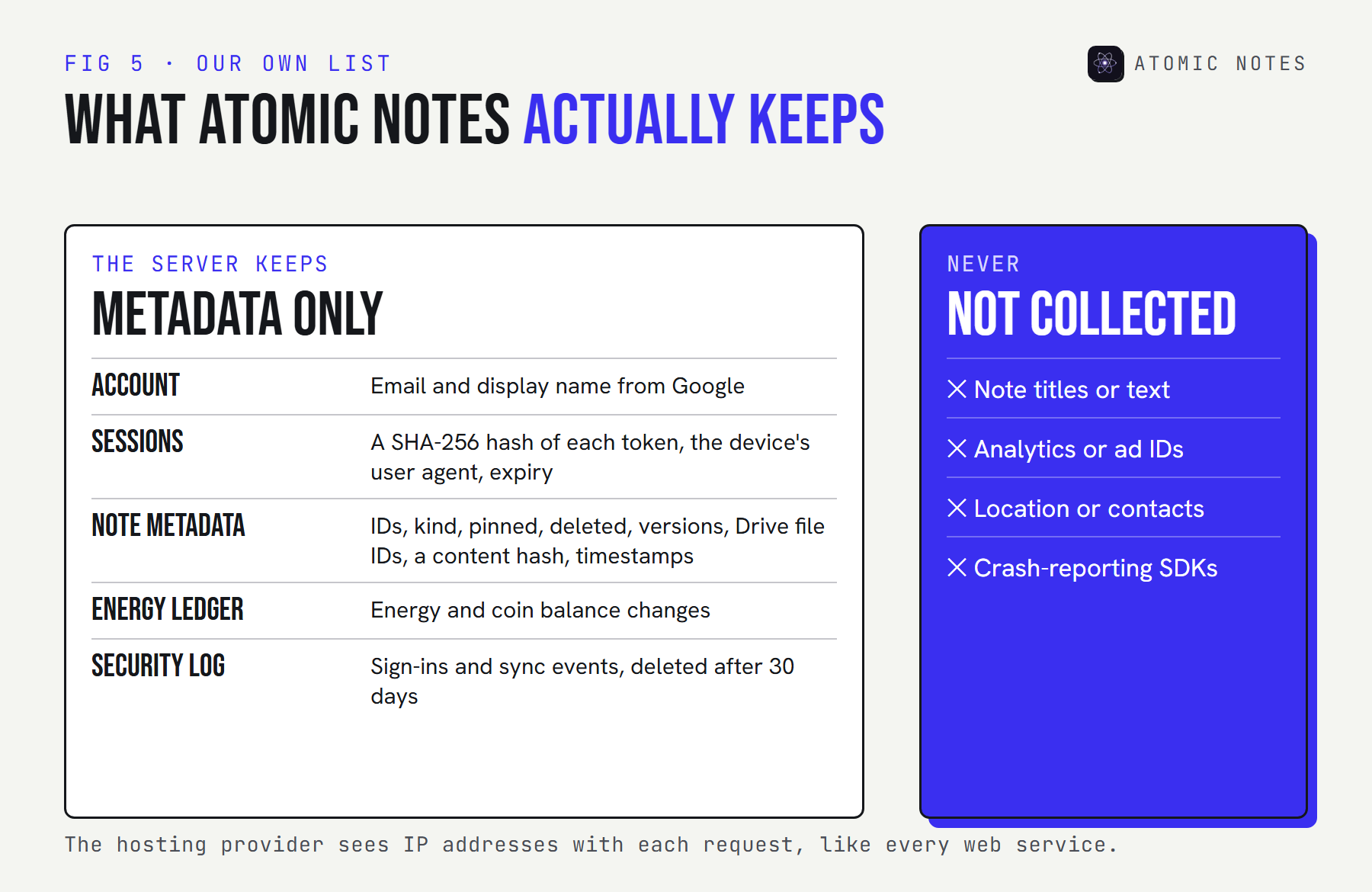
Metadata only, and here's the list. Our server never stores note titles or text, with the vault on or off. This is our full notes app data collection, in plain words. It does keep what sync and security need, and some of that is personal, so it belongs in public.
This is the shape of what the server stores for one note. The field names come from the server's schema, and the values here are made up:
One note's record on the Atomic Notes server · example values
{
  "_id": "3f2a9c41-8b2e-4c1d-9e57-0a6f2d1b7c90",
  "userId": "b81e4f02-5d7a-4c3b-a1e9-62c0f8d4a3e1",
  "kind": "todo",
  "pinned": false,
  "deleted": false,
  "encV": 1,
  "driveFileId": "1AbCdEfGhIjKlMnOpQrStUvWxYz",
  "localVersion": 7,
  "contentHash": "9c1f0e…",
  "syncStatus": "synced",
  "createdAt": "2026-09-30T21:14:02Z",
  "updatedAt": "2026-10-06T23:52:11Z"
}
No title, no body, no checklist items. With the vault on, encV is 1 and the note's file in your Drive holds only ciphertext. With it off, the text goes to your Drive in readable form, passing through the server on the way without being stored.
The rest of the list:
- Account: your email and display name, from your Google sign-in.
- Sessions: a SHA-256 hash of each session token, never the token itself, plus the device's user agent and an expiry date. You can see and revoke sessions.
- Energy ledger: changes to your Atomic Energy and coin balance.
- Security log: sign-ins and sync events, deleted automatically after 30 days. Deleted notes' records are cleared after 30 days too.
- Not collected: analytics, advertising IDs, location, contacts, and crash reports. The app ships none of those SDKs.
Two honest footnotes. Our hosting provider sees IP addresses with every request, like any web service. And this website uses a cookieless page analytics tool, separate from the app, which never sees your notes.
Are there apps that don't collect data at all?
Yes, if they never sync. An app with no internet permission can't send anything anywhere, so it collects nothing on a server. Several private Android notes apps work this way, and I list them in the best private notes apps for Android.
The catch is the same one every time: no sync means no backup and no second device, unless you copy files yourself. Any app that syncs keeps some notes app metadata, because sync can't work without it. Apps that don't collect data in the strict sense don't sync. The realistic goal for a syncing app is the smallest possible list, with a short retention period, published in plain words.
FAQ
What is notes app metadata?
It's the data around your notes rather than the notes themselves: your account email, IP address, device, sign-in times, sync activity, how often you use the app, and when each note changes. It can reveal a lot about you even when every note is encrypted.
Does end-to-end encryption hide notes app metadata?
No. End-to-end encryption hides what you wrote. The server still needs some metadata to sync, such as note IDs, versions, and timestamps. The best protection for metadata is collecting as little as possible and deleting it on a fixed schedule.
Can a notes app track my location?
Without location permission, it can't read your GPS. It still sees your IP address with every sync, which gives a rough location. Check whether the app stores IP addresses, for how long, and whether it sends them to analytics or advertising tools.
How do I find out what data a notes app has on me?
Read its privacy policy and store data safety label first. Then ask the company for a copy of your data, which privacy laws in many regions require it to provide. The response usually lists logs and metadata the policy only hinted at.
Are there notes apps that don't collect data?
Yes. Apps without internet permission keep everything on your phone and collect nothing on a server. The trade-off is no sync. Syncing apps always keep some metadata, so look for a short, published list and fixed retention periods.
Keep reading
- Notes app privacy: 9 red flags to check
- Encrypted notes explained: T2T vs end to end encryption
- Local first architecture: the 4 layers behind Atomic Notes
- 7 note taking apps with no AI reading your notes
- Why encryption alone does not make notes private
Atomic Notes by DevBehindYou
No analytics SDKs, no ad IDs, and no note text on the server. The metadata we do keep is listed above and in our privacy policy, with logs deleted after 30 days. Read the privacy policy.
Sources
- Why metadata matters. Electronic Frontier Foundation, Surveillance Self-Defense
- We kill people based on metadata. David Cole, The New York Review of Books, May 2014
- GDPR Article 5: principles relating to processing of personal data
- Provide information for Google Play's data safety section. Play Console Help
- What Exodus Privacy does. Exodus Privacy
- Atomic Notes privacy policy